

Kia’s Infotainment System — Discover User-Friendly Tech
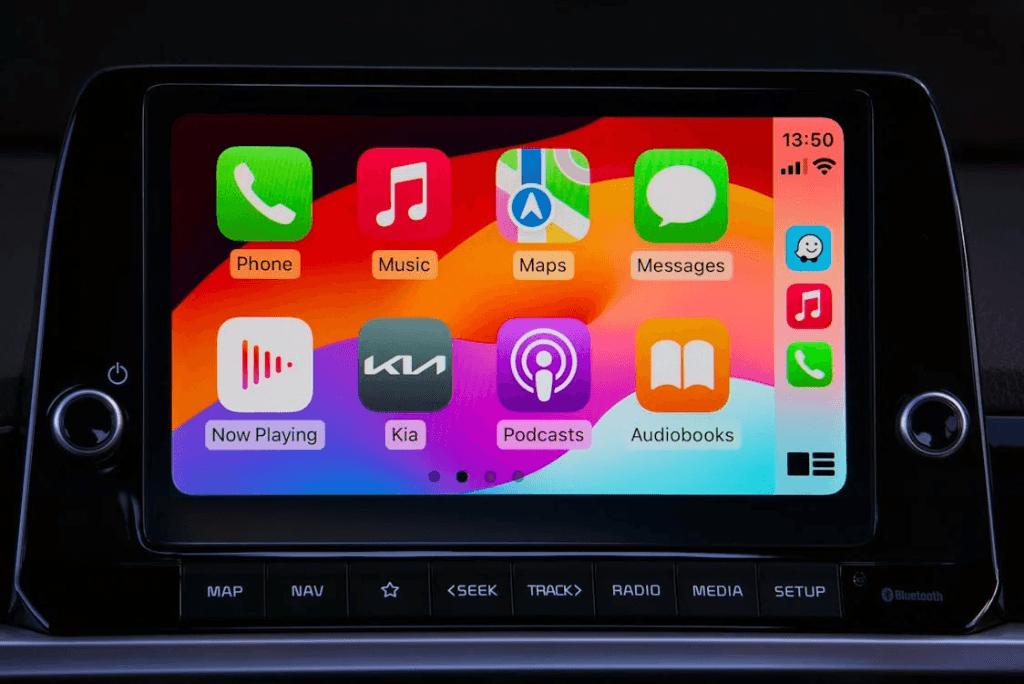
Infotainment systems have become ubiquitous in modern vehicles over the years, and it’s easy to see why. As the hub for all in-vehicle information, navigation, and entertainment features, a car’s infotainment system enhances driving convenience and enjoyment.
Kia Motors has received acclaim for its high-tech, futuristic, and intuitive infotainment system. Our team at Pride Kia of Lynn, Massachusetts, has compiled this Kia infotainment system update to help you discover all the exciting tech features, explain how they work, and provide tips on maximizing the infotainment system for a more immersive driving experience.
Key Features of Kia’s Infotainment System
Kia’s infotainment system has many integrated features and capabilities for more connected driving. Here are some key features every recent Kia offers with its infotainment system.
Aesthetic Design and Easy Navigation
All new Kia models feature an impressive multimedia display mounted precisely on the dashboard for easy driver access. The size of the infotainment touch screen varies depending on the model. The Kia Sorento’s infotainment system features integrated dual 12.3-inch displays, while the Kia EV9 infotainment system boasts a triple-panel display comprising two 12.3-inch touch screens and a third 5.3-inch display.
Connectivity Options: Apple CarPlay and Android Auto
Apple CarPlay and Android Auto compatibility is standard on most Kia models and allows you to wirelessly connect your smartphone with your Kia’s infotainment system. Once connected, you can access all your apps, messages, maps, and more from your car’s touch screen.
Advanced Voice Recognition Capabilities
Connecting your smartphone to your Kia infotainment system lets you access your device’s voice control feature to make calls and respond to messages without taking your hands off the steering wheel. Kias also have a built-in voice assistant that you can use to control features such as temperature and music.
Integrated Navigation System for Hassle-Free Travel
Kia’s infotainment package features an integrated navigation system that provides alternative routes, real-time traffic updates, and turn-by-turn driving directions to ensure you’re never stuck. You can also use your smartphone’s navigation apps like Google Maps to maneuver through busy city streets and reach your destination as fast and efficiently as possible.
Bluetooth Integration for Seamless Connectivity
All recent Kia models are Bluetooth-enabled to facilitate hands-free calling and audio streaming. Pair your smartphone to the infotainment touch screen via Bluetooth to start enjoying all your favorite media on the go.
Rear Camera Display and Safety Enhancements
Another vital feature integrated into Kia’s infotainment system is the rear camera, which provides a clear view behind your vehicle when reversing and alerts you if an object is detected. This feature allows you to make safer parking maneuvers and reverse confidently into tight spaces.
Enhancing Your Experience: Tips and Tricks
While Kia’s infotainment system offers plenty of convenience and utility, there are some additional tricks you can apply to get the most out of it. Here are a few recommendations on how to enhance your driving experience by making the best use of the infotainment features.
Customizing Your Home Screen and Settings
Kia’s infotainment system lets you customize the screen layout for a more efficient and user-friendly experience. You can organise organize your home screen so that your most frequently used apps are just a tap away. Doing so will ensure you can access the apps easily, saving time and minimizing distractions while driving.
Maximizing Entertainment Features and Options
Kia’s infotainment system offers various entertainment features for a more enjoyable time on the road. Bluetooth compatibility lets you listen to your favorite playlist through Kia’s infotainment system. The most up-to-date Kia infotainment systems, found on recent models, also feature Sirius XM and HD Radio, providing unfettered access to hundreds of music and podcast channels.
Essential Tips for Voice Command Efficiency
While Kia’s voice recognition feature is a useful addition to the infotainment system, getting the most out of this tool depends on your fluency. Here are some tips to ensure your voice commands translate easily:
- Make your commands simple and concise to avoid confusion or misinterpretation.
- Speak directly into the microphone with a clear voice to ensure the system accurately interprets your command.
- Take brief pauses between commands to allow time for the system to process each command.
- Set the voice recognition system to your preferred language and accent for better accuracy.
Troubleshooting Common Connectivity Issues
While Kia’s infotainment system is regularly updated to ensure it functions smoothly, connectivity issues can arise. Identifying and resolving these issues can significantly enhance your driving enjoyment.
One commonly reported issue is Bluetooth connection disruptions, which usually occur due to software glitches and disruptions by other devices. If you encounter this problem, updating your infotainment software and deleting unused devices can help. If the problem persists, consider having your Kia inspected by a technician.
Accessibility and Integration With Other Technologies
Kia’s infotainment system seamlessly integrates with the Kia Access app, providing greater convenience and control over your vehicle. This app includes many remote access features to keep you connected to your Kia even when you’re not driving. Some key functions on the app include remote start, locking and unlocking, and remote battery control.
These functions are accessible via your smartphone once you connect your Kia to your mobile device; other Kia Access features are accessible from the infotainment system. These include maintenance alerts, routing and location, weather information in 25,000+ cities worldwide, and battery life monitoring for Kia electric vehicles.
Embrace the Future of Driving at Pride Kia of Lynn
Kia’s infotainment system greatly improves the in-cabin experience of Kia vehicles. With a user-friendly touch-screen display, voice recognition capabilities, and integrated navigation, this system provides plenty of functionality. Listen to your favorite music and podcasts, make hands-free calls, and use voice commands to control key vehicle functions such as climate and audio.
Are you ready to experience the future of driving? Schedule a Kia test-drive at Pride Kia of Lynn for a real-life tour of this innovative infotainment system. Our experienced team will be happy to show you how to make the best use of its many features. We’ll also happily help you browse new cars for sale as well.
Touchscreen Display in Kia Stonic by Mike Bird is licensed with Pexels License
0 comment(s) so far on Kia’s Infotainment System — Discover User-Friendly Tech